
A virtual microphone on Linux without the setup: how Simple Voice Changer creates and removes it
On Linux you don’t need a driver to make a fake microphone: the sound server can create one at run time. The catch is that someone has to create it, keep it configured, and clean it up. Here’s what that involves, and an app that does it for you.
What a virtual microphone is
Two devices: a null sink (a fake output; anything played into it goes nowhere) and a remapped source (a fake microphone that reads the null sink’s monitor). Send a program’s audio to the sink, select the source as the microphone in Discord or a game, and that program’s audio arrives as “mic input”. Mix your real mic into the same sink and your voice arrives alongside it.
PipeWire (which SteamOS and every current desktop distribution ship) and PulseAudio can both do this. The pieces are two sound-server modules, plus a loopback for your real microphone, plus routing every program to the right device.
Why doing it by hand gets old
- It’s per session. Modules loaded at the command line vanish at reboot, so it’s a text file in
~/.config/pipewire/or~/.config/pulse/that you maintain, and that goes stale when the distribution updates. - Routing is manual. Each program that should be heard through the mic has to be pointed at the sink, and your real mic looped in, every time.
- There are no effects. A raw virtual mic passes audio through. Voice effects, a soundboard and ducked music are separate problems on top.
- It’s easy to leave behind. A stray null sink in your device list is the classic symptom of a half-finished setup.
- It’s easy to loop. If the null sink ever becomes your default speaker, the call is played back into the mic and everyone hears themselves.
What the app does instead
Simple Voice Changer creates the pair itself when it starts, as your normal user, and unloads them when it quits. We watched it on this site’s build machine (PipeWire 1.6.2, pactl info reporting “PulseAudio (on PipeWire 1.6.2)”): with the app running, pactl list short modules showed a null sink named svc_sink (“Simple Voice Changer Output”) and a remapped source named svc_mic (“Simple Voice Changer Mic”); after quitting the app, both were gone. No root, no config file, nothing left behind.
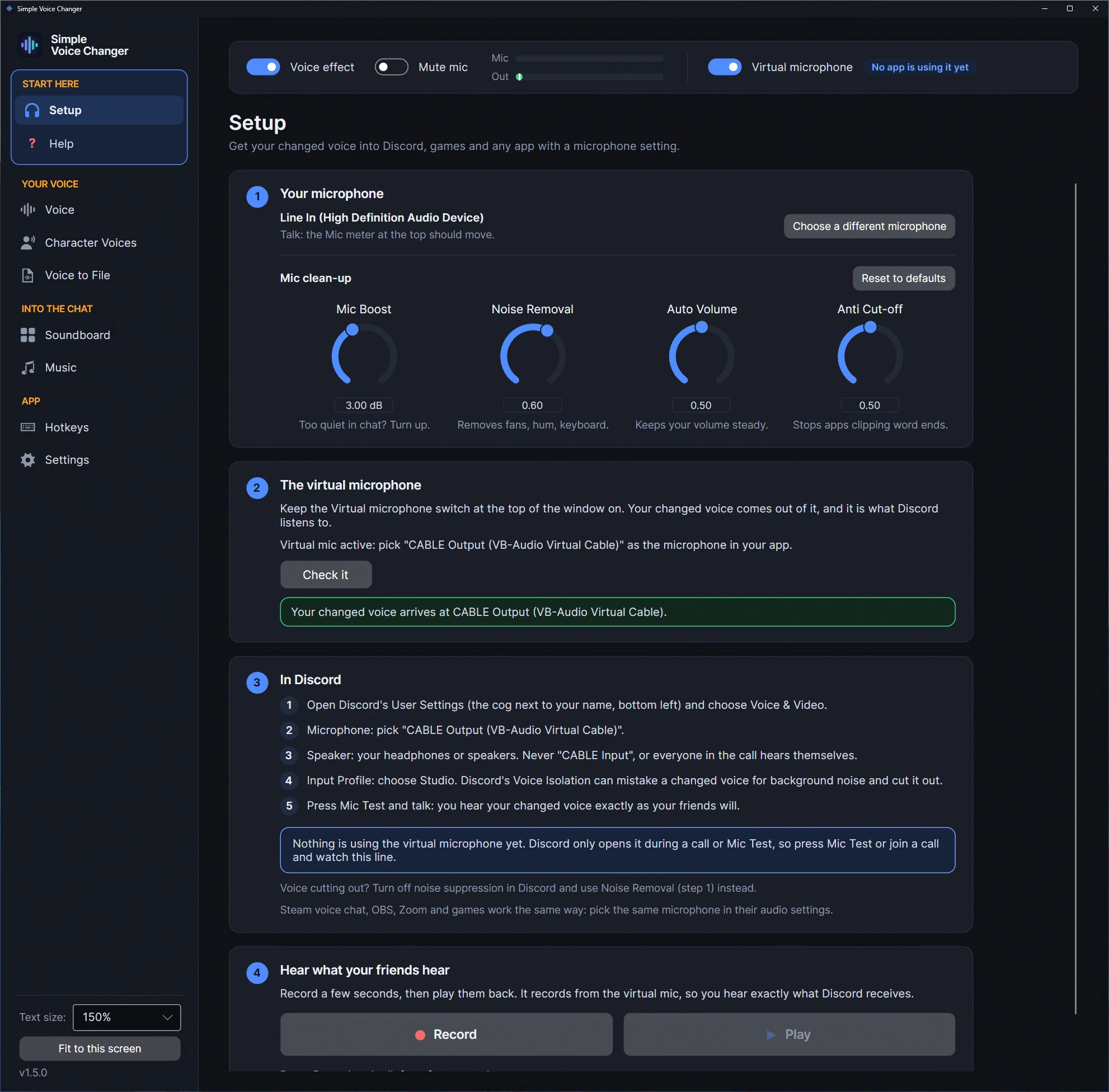
Your real microphone, with the voice effect applied, plus soundboard clips, ducked music and anything you send with App to Mic, arrive at that source. In Discord, Steam chat, OBS or the game, you pick Simple Voice Changer Mic as the input, once.
The app also checks its own work. On the Setup page, Check it plays a short, quiet tone into the virtual mic and listens for it at svc_mic, then says whether it arrived, or why not (no sound server, nothing arrived, the far end can’t be opened). Setup also names the programs that are listening to the virtual mic right now, and warns you when “Simple Voice Changer Output” has become your default speaker, the loop from the list above.
Hotkeys on Wayland
On KDE Plasma 6 (SteamOS’s Desktop Mode included) and GNOME 48 or later, the hotkeys are registered with the desktop itself, which may ask you once to confirm them; the Hotkeys page says when one is still waiting. On other Wayland desktops they read /dev/input, so add your user to the input group (sudo usermod -aG input $USER, then log out and in; the app shows the command); on X11 nothing is needed. That’s the only setup on Linux; everything else is automatic. One-time purchase on Steam, for any distribution with PipeWire or PulseAudio, and for the Steam Deck in Desktop Mode.
Related guides
-
A voice changer for Linux in 2026: native, from Steam, with a soundboard (and no, Voicemod doesn't run here)
Simple Voice Changer is a native Linux voice changer and soundboard sold on Steam: it creates its own PipeWire or PulseAudio virtual microphone with no driver and no root, runs under the Steam Linux Runtime on any current distribution and SteamOS, and was verified on this site's Linux machine.
-
How to play music through your mic on Discord, and the two mistakes every tutorial makes
Playing music, Spotify or sound effects through your mic in Discord, games or streams on Windows or Linux: why music routed through a voice changer comes out pitch-shifted, why a music bed breaks voice detection unless it ducks, and how Simple Voice Changer's Music page and App to Mic handle both.
-
A soundboard for Linux and the Steam Deck: Soundpad doesn't run here, so here's one that does
Soundpad is Windows-only (its Steam page lists Windows 7 or newer and nothing else). Simple Voice Changer's Soundboard runs natively on Linux and SteamOS: named boards, a global hotkey per sound, clips mixed into the same virtual mic as your voice, verified on this site's Linux machine.