
How voice changers work: pitch, formant, robots, neural voices and what each can't do
A classic voice changer is signal processing: a chain of effects you set by hand, each with a knob. A neural voice changer learns what other voices sound like and re-voices you as one of them. Knowing what each does, and what neither can do, tells you whether it’s the tool you want before you buy.
What a classic voice changer is
Your microphone’s audio goes through a chain of effects in real time: shift the pitch, move the resonances, add a robot buzz, clip it, echo it. Each effect has a knob. The result is your voice, changed. It runs on an ordinary CPU, with no voice models to download and nothing to log into.
Simple Voice Changer has this kind of chain, and two optional neural features in front of it. This page explains what each effect does, then how the neural kind differs, and ends with what each can’t do.
The effects, one by one
Pitch shift moves every frequency up or down by a number of semitones. Up sounds smaller and younger; down sounds bigger and older. Shift too far on its own and you get the “chipmunk” or “demon” effect, because the shape of the voice moved with the pitch.
Formant shift is the fix for that. Formants are the resonances of your mouth and throat, the thing that makes an “ee” sound like “ee” at any pitch. Shifting formants without pitch changes the apparent size of the speaker; shifting pitch without formants keeps the voice sounding like the same person, just higher or lower. Real changes use both, in different amounts: the app’s own Help suggests turning Formant the other way by about half as much as Pitch, so Pitch +6 with Formant −3 is a higher voice, while Pitch +6 alone is a chipmunk.
Breath and melody are subtler shaping: adding breathiness, and stretching or flattening the pitch movement within a sentence. They nudge how a voice reads; they don’t transform it.
Autotune snaps the pitch to the nearest note. On speech it produces the stepped, singing quality everyone knows.
Robot adds a fixed-frequency buzz (ring modulation) that gives the classic metallic voice. Vocoder goes further: it measures the loudness of your voice in a set of frequency bands and applies that pattern to a synthesised tone, so the words are yours but the sound is the synth.
Distortion clips the waveform; bitcrush reduces the sample resolution and rate, which is the crunchy “8-bit” effect. Both add harmonics that weren’t there.
Whisper, growl and tremor replace or modulate parts of the voice: whisper swaps the voiced part for noise, growl adds a rough sub-harmonic, tremor wobbles the volume.
Flanger, phaser and auto-wah are “motion” effects: a moving comb filter, a moving notch, and a sweeping band-pass, respectively. They give the swirling, watery or “wah” character.
Bass, mid, presence and treble are plain tone controls. Echo repeats the voice after a delay; reverb simulates a room by adding thousands of tiny reflections. Both make a voice sound like it’s somewhere.
Layers add extra copies of the voice at different pitches, for choruses and chords.
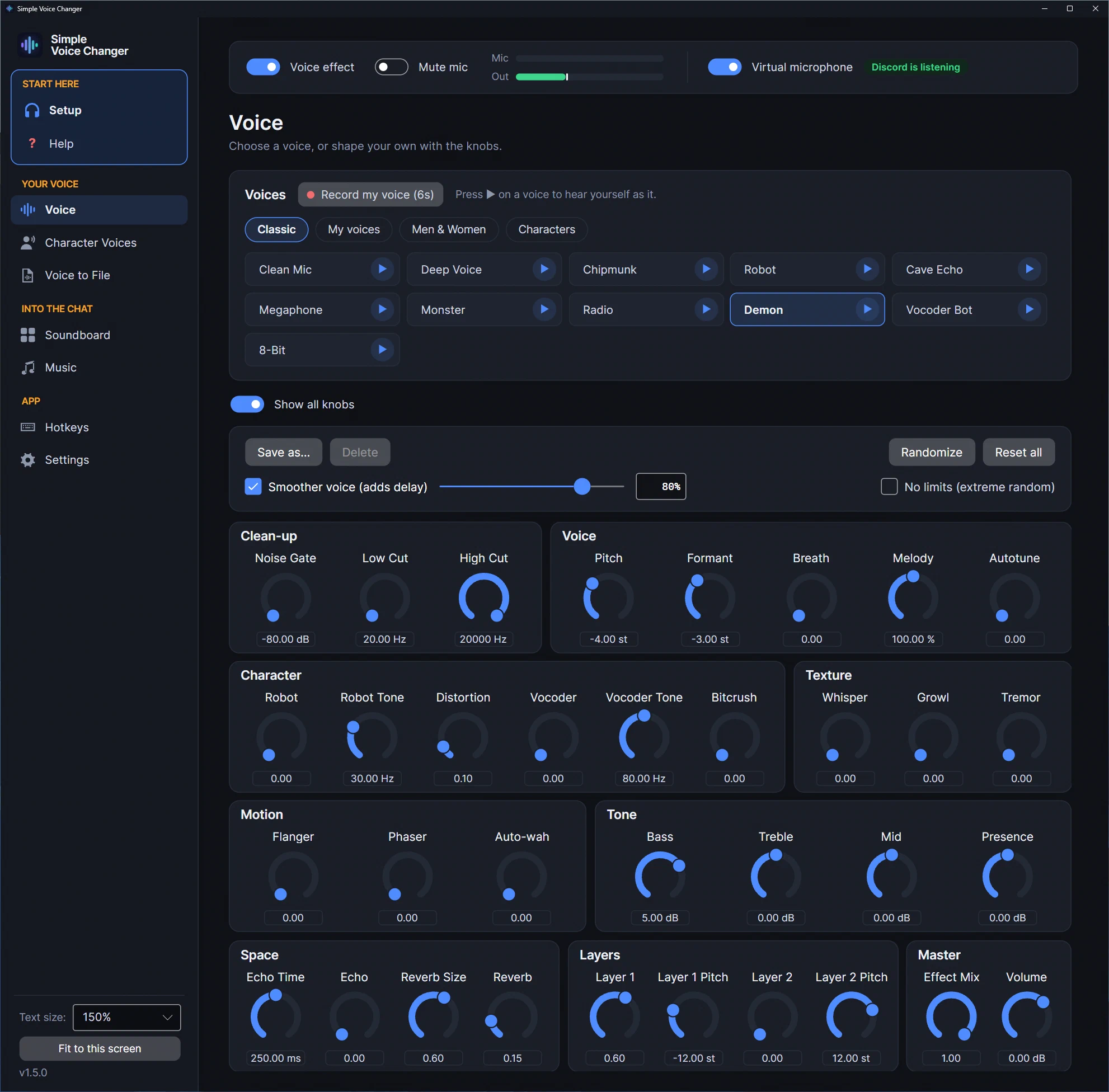
Simple Voice Changer has all of these as knobs, 34 in all, grouped as Clean-up, Voice, Character, Texture, Motion, Tone, Space, Layers and Master. Its ten classic presets are just saved knob positions, and the Voice page shows only the few that matter for the voice in use until you turn on Show all knobs.
Neural voice conversion: a different kind of tool
A neural voice changer doesn’t stack effects. A neural network trained on recordings of many voices listens to your speech in small chunks and re-voices it as one of the voices it learned. Your words, timing and accent come through; the sound of the voice is the network’s.
Simple Voice Changer has two of these, both optional and off until you pick one, and both running on your own PC with nothing uploaded:
- Neural voices use a small network (Beatrice 2) that knows 200 voices, men and women, learned from public-domain audiobook recordings. It’s light enough to run on the processor.
- Character Voices runs an RVC voice model that you supply: a model trained on one particular voice, usually shared as a
.pthfile. None is included. RVC models are heavier, so a gaming graphics card is recommended.
Effects still work on top of either, so a neural voice can be put through a radio or a cave.
How the changed voice reaches Discord or a game
An app can’t change what your microphone sends to other programs directly. The trick most voice changers use is a virtual microphone: a fake input device that the voice changer writes into and that Discord, Steam chat, OBS or the game reads from as if it were a normal mic.
- On Windows, the virtual device is a driver. Simple Voice Changer uses VB-CABLE (by VB-Audio, donationware), which Steam installs during installation; Windows may need one restart before it appears. The app sends its output to the cable’s input, and you pick the cable’s output as your microphone in the other program.
- On Linux and SteamOS, the sound server (PipeWire or PulseAudio) can create virtual devices at run time. The app creates a null sink and a remapped source as your normal user when it starts, and removes them when it quits. We checked this on the site’s build machine: with the app running,
pactl list short sourcesshowed a new source, and after quitting it was gone. The virtual microphone on Linux page explains what it creates.
Inside the app, the signal path is: microphone → clean-up (noise gate, noise removal, auto volume) → the neural voice or character model, if one is on → the voice effect chain, which ends in a limiter → soundboard clips mixed in → music and App to Mic mixed in, ducked under your voice and the clips, under the same ceiling → the virtual microphone. Clips and music join after the effects, so they are never pitch-shifted, which is the mistake most VB-CABLE tutorials make; see playing music through your mic.
Delay
Every real-time effect adds some delay, because it has to hear a little of your voice before it can process it. Pitch and formant shifting need the most of the classic effects; a plain echo needs none. Simple Voice Changer’s Smoother voice option trades a little more delay for a cleaner result. We haven’t measured the classic chain precisely, so we don’t quote a number for it.
Neural conversion needs more, because the network has to hear a chunk of speech before it can re-voice it. The app shows each neural voice’s delay; on our test machines it was about 75 to 85 ms. An RVC model adds about 0.3 seconds on a graphics card and about half a second on a processor, which people on a call will notice. That’s why the app tells you before you rely on it in a call, and why every voice has a play button that lets you hear yourself through it first.
What classic effects can’t do
This is the part to read before buying any classic voice changer:
- A specific person. No knob combination makes you sound like a named person or character.
- A convincing different gender. Pitch and formant shifting can move a voice a long way, but the result is recognisably processed. If that’s what you need, it’s the job of a neural voice, not of the knobs.
- Hiding who you are. A pitch-shifted voice is still your cadence, your accent and your vocabulary.
What classic effects do well: robot, monster, radio, megaphone, cave and 8-bit voices; a deeper or higher version of yourself for a character; and a set of knobs you can turn while you talk, with no account and no server.
What neural voices can’t do
- Change how you speak. The voice changes; your words, pace, accent and expression stay yours. A character is partly acting.
- Keep every word crisp. Re-voicing smears some consonants into the next word. In a speech-to-text test of Simple Voice Changer’s neural voices, about one word in six came out wrong at a natural pace (one in fifty with the neural voice off), and more when talking fast; talking slowly didn’t help. Talk at a normal pace with clear consonants.
- Be better than the model. Simple Voice Changer’s 200 neural voices are anonymous audiobook readers, not copies of famous people. With your own RVC model you sound like that model, as good as it is, and models vary a lot.
- Run without a cost. They take more processor (or graphics card) and add more delay than classic effects. Older PCs may struggle; the app’s Lower CPU use option and Test my computer are there for that.
- Make it OK to impersonate someone. Use only voices you have the right to use. Pretending to be a real person can be illegal.
Related guides
-
A voice changer without a subscription, an account or a server: what 'buy once' actually gets you
How subscription voice changers are sold, without quoting prices, and what changes in practice when the app is bought once on Steam, runs offline and needs no account: no renewals, no lock-outs, no forced redesigns, your files on your PC. With the honest trade-off.
-
A Voicemod alternative that runs offline, on Linux, with no subscription
Why people look for a Voicemod alternative (subscriptions, the V3 redesign, log-in outages, more than one soundboard, moving to Linux) and what Simple Voice Changer does about each: neural voices on your CPU, your own RVC models, named soundboards, music and apps under your voice, offline, one price, Windows and Linux.
-
A voice changer for Linux in 2026: native, from Steam, with a soundboard (and no, Voicemod doesn't run here)
Simple Voice Changer is a native Linux voice changer and soundboard sold on Steam: it creates its own PipeWire or PulseAudio virtual microphone with no driver and no root, runs under the Steam Linux Runtime on any current distribution and SteamOS, and was verified on this site's Linux machine.