
A voice changer for Linux in 2026: native, from Steam, with a soundboard (and no, Voicemod doesn't run here)
Half the ‘best Linux voice changers’ lists are written by Windows-only vendors, and the one Linux project everyone links to has been archived. Here’s a voice changer that installs from Steam and runs natively, tested on this site’s own Linux machine.
Does Voicemod work on Linux?
No. Voicemod’s own help article Voicemod on other platforms (updated 12 Sep 2026, checked 16 Sep 2026) lists Linux under “On our roadmap (but not here yet)” and calls the targets “aspirational”. People have tried Wine; the driver-level virtual audio device Voicemod depends on is the part that doesn’t translate, and nobody on the threads we read got it working for live use. Clownfish is Windows-only too.
The Linux project most lists still recommend, Lyrebird, says in its own README: “As of December 2023, Lyrebird has ceased development and is now archived”, and, on quality, “The voice changer operates with a few seconds of delay.” A few seconds of delay rules it out for calls. That is the state of the usual answers.
The native option: Simple Voice Changer
Simple Voice Changer is a native Linux build sold on Steam, and as of 16 Sep 2026 it was the only Linux result in Steam’s own search for “voice changer”. What it does on Linux:
- Creates the virtual mic itself through PipeWire or PulseAudio as your normal user, and removes it when it quits. We watched it on this site’s build machine (PipeWire 1.6.2): while the app ran,
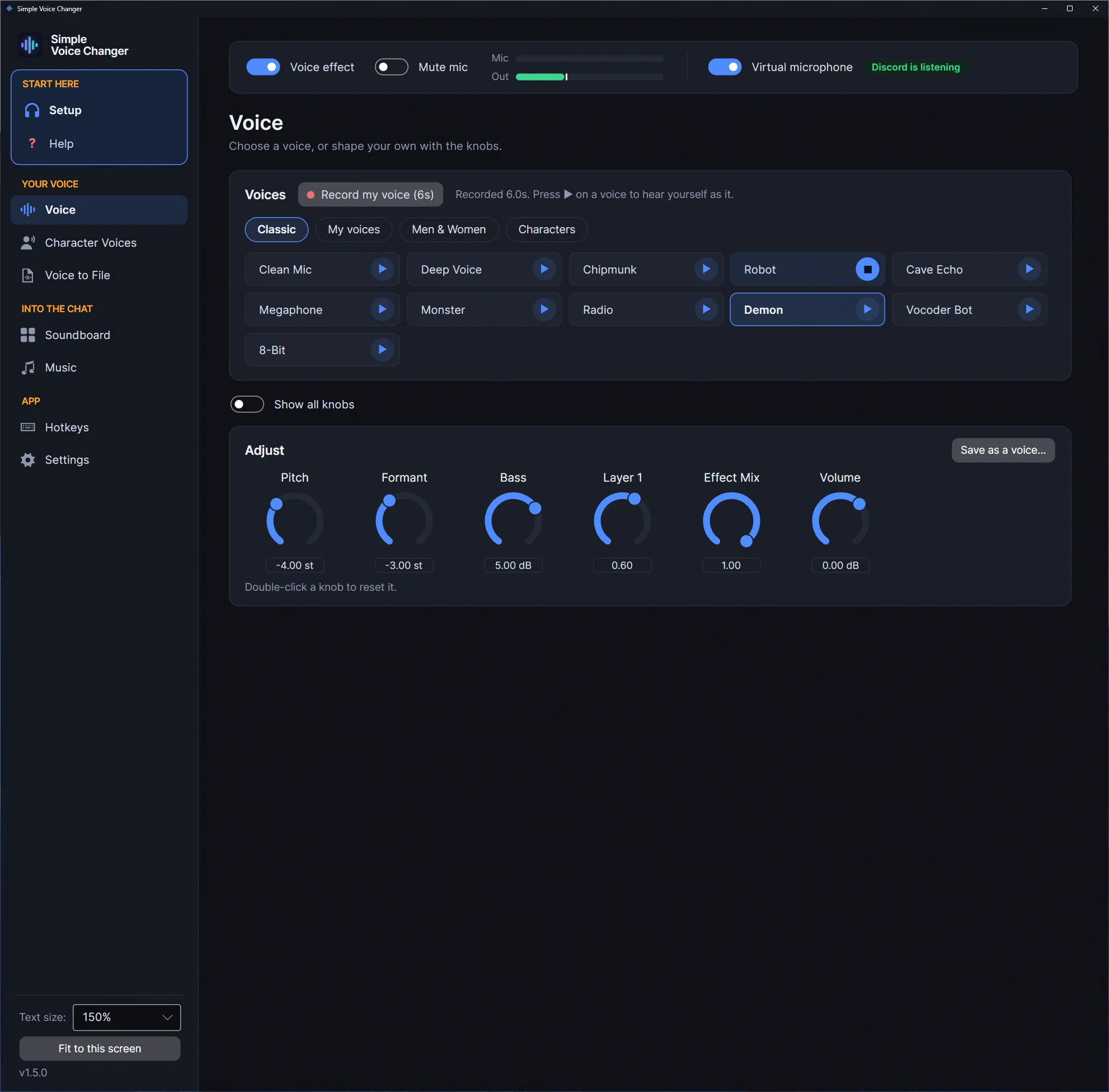
pactl list short sourcesshowedsvc_mic, described as “Simple Voice Changer Mic”; after quitting, it was gone. No driver, no root, no config file, nothing left behind. The app’s Setup page can check it for you: Check it sends a short, quiet tone through the virtual mic and listens for it on the far side. - The same voices as on Windows. 200 neural voices that run on your CPU, Character Voices for RVC voice models you bring yourself (a graphics card is used through Vulkan; none is needed for anything else), and Clean Mic plus ten classic effects with 34 knobs, saved voices with hotkeys and Randomize. Every voice has a play button that plays your own six-second take through it before you go live. The how voice changers work page explains what each kind can and can’t do.
- A soundboard, a music player and App to Mic in the same virtual mic, all mixed in after the voice effect so they’re never pitch-shifted. App to Mic sends another program’s sound (Spotify, a browser, Discord) into the mic by recording a copy of its streams through PulseAudio or PipeWire; nothing about where that program plays changes.
- Mic clean-up: noise removal (RNNoise, needs a 48 kHz device), auto volume, and Anti Cut-off for open-mic apps that clip word endings.
Distribution notes
| Works? | Notes | |
|---|---|---|
| Ubuntu, Mint, Pop!_OS, Debian | Yes | PipeWire on current releases; PulseAudio on older ones. Both are supported. |
| Fedora | Yes | PipeWire. |
| Arch, Manjaro, CachyOS | Yes | PipeWire. |
| SteamOS (Steam Deck) | Desktop Mode | See the SteamOS page. Game Mode hasn’t been verified by us. |
| JACK-only setups | No | The app needs PipeWire or PulseAudio. |
Tested on this site’s machine; the other rows follow from the Steam Linux Runtime, not from a test on each distribution. The build is compiled in Valve’s Steam runtime container and runs under that runtime, so it doesn’t depend on your distribution’s library versions.
Hotkeys on Linux
Wayland compositors don’t hand keystrokes to background apps, so global hotkeys need the desktop’s help. On KDE Plasma 6 (SteamOS’s Desktop Mode included) and GNOME 48 or later, the app registers its hotkeys with the desktop’s own global-shortcuts service. The desktop’s “confirm these shortcuts” window opens on top of the app, and the Hotkeys page says when a shortcut is still waiting for that confirmation, or when the desktop gave it no key. On other Wayland desktops the app reads /dev/input directly, so your user needs to be in the input group: sudo usermod -aG input $USER, then log out and back in. The app shows the same one-line command when it can’t read the devices.
On X11 nothing is needed, and since 1.5.1 a push-to-talk key is watched rather than grabbed, so holding it no longer freezes the game’s other keys. The automatic push-to-talk key the app can press for a game reaches X11 and XWayland programs, which includes Steam and Proton games, but not programs running natively on Wayland. Desktops without a system tray (GNOME without the AppIndicator extension) get a minimise instead of hide-to-tray.
Discord on Linux
The official Discord app and the browser version work the same way: Voice & Video → Microphone → Simple Voice Changer Mic, and set Discord’s Input Profile to Studio so its Voice Isolation doesn’t cut a processed voice. Keep your headphones as Discord’s speaker: if your system ever makes “Simple Voice Changer Output” the default speaker, everyone in the call hears themselves, and the Setup page warns you when that happens. The Setup page walks you through the rest and shows when Discord is hearing your changed voice.
In short
Neural voices, character models, classic effects, a soundboard, music and other apps under your voice, hotkeys in games, and an install from Steam that also runs on the Deck. One-time purchase, no account, nothing uploaded.
Related guides
-
A soundboard for Linux and the Steam Deck: Soundpad doesn't run here, so here's one that does
Soundpad is Windows-only (its Steam page lists Windows 7 or newer and nothing else). Simple Voice Changer's Soundboard runs natively on Linux and SteamOS: named boards, a global hotkey per sound, clips mixed into the same virtual mic as your voice, verified on this site's Linux machine.
-
A virtual microphone on Linux without the setup: how Simple Voice Changer creates and removes it
What a virtual microphone is on PipeWire or PulseAudio, why it usually means maintaining sound-server configuration by hand, and how Simple Voice Changer creates one automatically as your normal user, checks it, and removes it on quit, verified on PipeWire 1.6.